
ComfyUI Configuration
ComfyUI is a workflow tool for images and videos. It is not a regular chat tool; its core is not 'choose a model to chat, ' but to load a workflow and then fill in the prompts, images, and parameters into the workflow nodes.
Official information Downloads and documentation are subject to the official site.
First understand the workflow
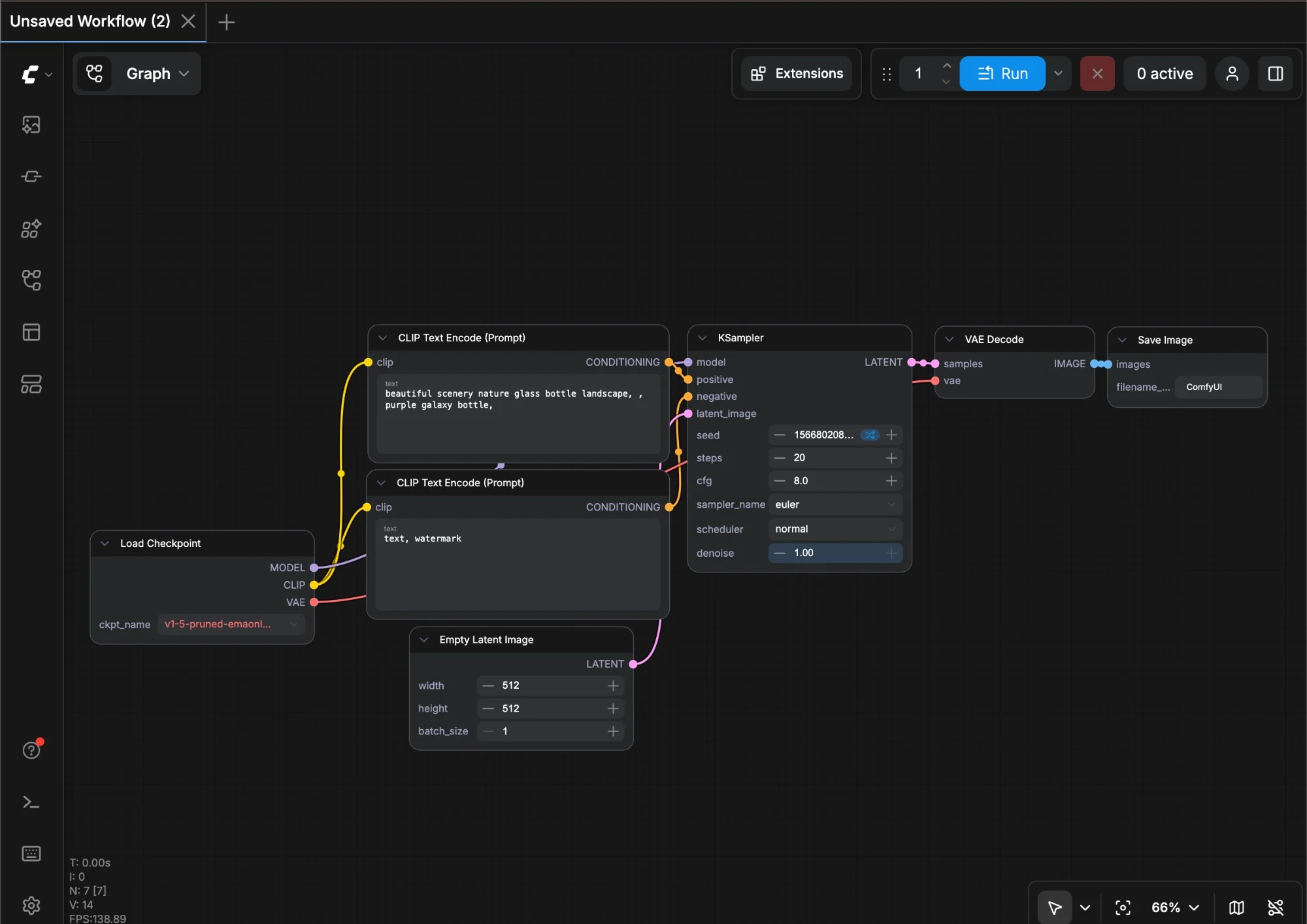
A ComfyUI workflow usually includes nodes such as model loading, prompts, samplers, dimensions, and output saving. The lines and nodes you see on the webpage are the steps for generating images or videos.
If you want to call ComfyUI through the API, you usually need to export the workflow into JSON in API format and then send it to the local or cloud ComfyUI service.
Workflow Interface Reference First understand nodes, connections, and the Run button, then look at API calls. The focus of ComfyUI is not the Key, but whether the workflow can run smoothly.
How to fill in the local address
| Configuration item | Filling Method |
|---|---|
| Web address | http://127.0.0.1:8188 |
| API address | http://127.0.0.1:8188/prompt |
| Workflow | workflow-api.json |
| Output | History / Output Folder |
- First start ComfyUI and make sure the browser can open it
http://127.0.0.1:8188. - Load a workflow in ComfyUI that can already successfully generate images.
- Enable the developer or API export option and save the workflow as API JSON.
- Send this JSON using a script or an API to
/prompt. - After generation, view the images from the history or output folder.
API Call Example
Send the workflow to the local ComfyUI
curl -X POST http://127.0.0.1:8188/prompt \ -H "Content-Type: application/json" \ -d @workflow-api.jsonMost errors in image/video workflows come from missing model files, inconsistent node versions, or insufficient video memory, so don't just check the Key and Base URL.
Common Questions for Beginners
| Phenomenon | Priority check | Handle |
|---|---|---|
| The webpage can open but the API fails | Is the request address /prompt, whether the workflow is exported in API format | First run it in the web page, then re-export the API JSON |
| Prompt: Missing node | The workflow uses custom nodes that are not installed on your machine | Install the node according to the workflow instructions, or try testing with a different basic workflow |
| Prompt: Model file does not exist | File paths for checkpoint, LoRA, VAE, etc. | Put the model file into the corresponding directory of ComfyUI, then select it after restarting |
| Insufficient video memory | Image size, batch quantity, model size | First reduce the size and batch, confirm that images can be generated, then increase the parameters |