
Stable Diffusion WebUI Configuration
Stable Diffusion WebUI is commonly used for local image generation. It is different from chat tools: you mainly configure the model files, sampler, size, steps, and prompts. If you want other tools to call it, you need to enable the API first.
Official information Downloads and documentation are subject to the official site.
Enable API
| Configuration item | Filling Method |
|---|---|
| Startup parameters | --api |
| Web address | http://127.0.0.1:7860 |
| API documentation | http://127.0.0.1:7860/docs |
| Text-to-image API | /sdapi/v1/txt2img |
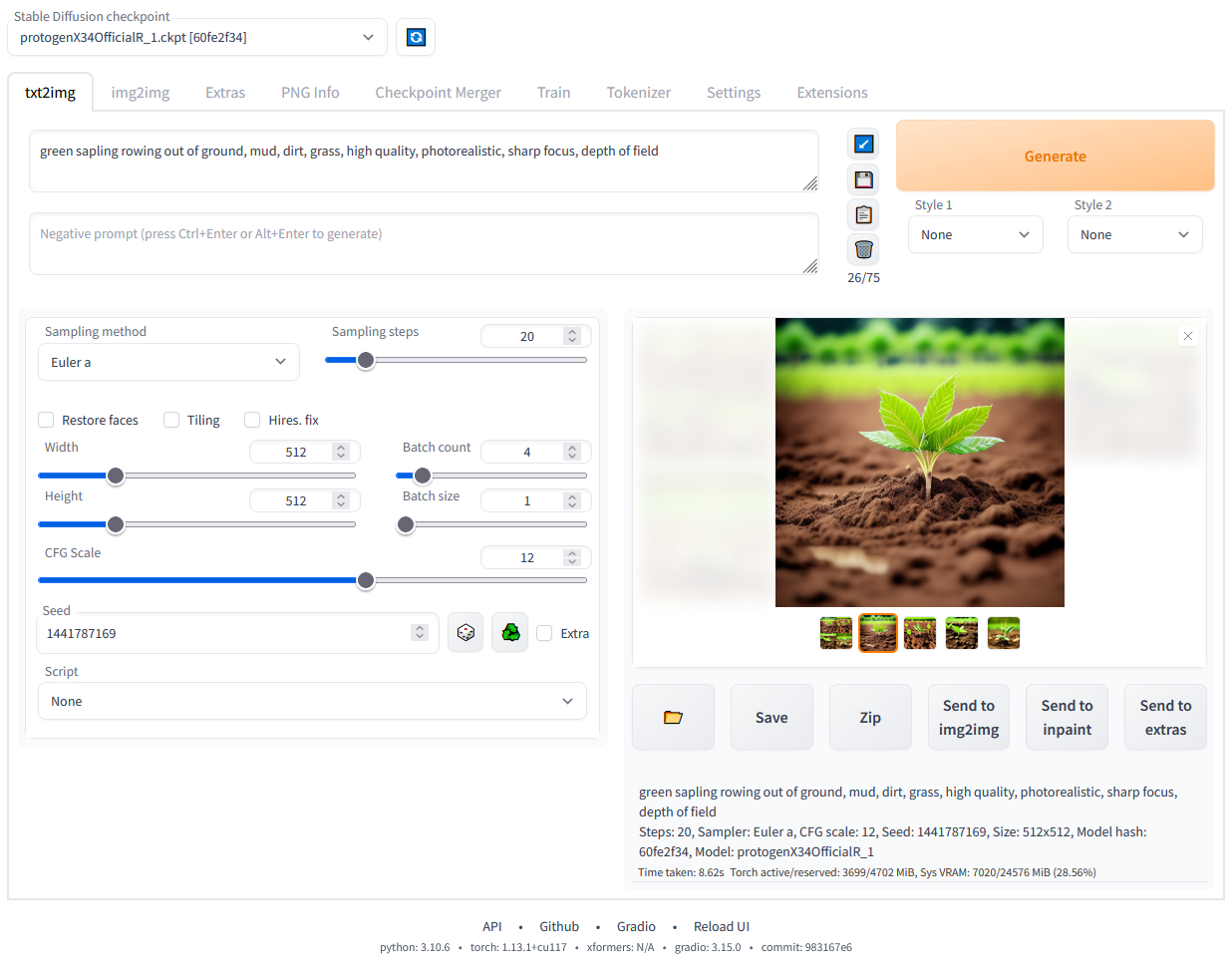
WebUI interface reference This image is used to confirm the main interface layout. Whether the API is available depends on whether --api was added during startup and if /docs can be opened.
- Install and start Stable Diffusion WebUI.
- If you want scripts to call it, add the following at startup
--api. - Open
http://127.0.0.1:7860/docsand confirm that the API documentation can be opened. - First generate an image successfully in the web interface, then test with the API.
- If errors occur, first check the model files, video memory, sampler name, and image size.
Understanding image generation parameters
| Setting | Meaning | Tips for beginners |
|---|---|---|
| prompt | Positive prompts | Write what you want to appear in the image |
| negative_prompt | Negative prompts | Write what you do not want to appear |
| steps | Sampling steps | Start with 20 to 30 steps, do not set it too high initially |
| width / height | Image Size | Start with 512 or 768 level, lower it if VRAM is insufficient |
| sampler_name | Sampler | Start with the default or the sampler that works on the web |
API Example
Minimum request for text-to-image in SD WebUI
curl -X POST http://127.0.0.1:7860/sdapi/v1/txt2img \ -H "Content-Type: application/json" \ -d '{ "prompt": "a clean product photo of a white ceramic cup", "negative_prompt": "blurry, low quality", "steps": 20, "width": 512, "height": 512 }'Common Questions for Beginners
| Phenomenon | Priority check | Handle |
|---|---|---|
/docs Cannot open | Whether it was added at startup --api | Restart WebUI and make sure there are no errors in the console |
| Images work on the web, but not through the API | Is the API address /sdapi/v1/txt2img | Test with the minimum request first, do not add too many parameters at once |
| Sampler error | Does sampler_name exist | Try not filling in sampler_name, or use the sampler that currently works on the web |
| Insufficient video memory | Width, height, steps, batch quantity | Start with 512x512, 20 steps, then gradually increase |